

Why 2026 Changed AI Music Workflows
The era of treating AI music generators as standalone black boxes is over. In 2026, the most effective tools are those that fit directly into your Digital Audio Workstation (DAW) workflow. Instead of just spitting out a finished MP3, these platforms prioritize MIDI export and stem separation, allowing you to tweak notes, adjust instrumentation, and mix elements alongside your own production.
This shift reflects a broader move toward agentic AI systems that act as digital collaborators rather than passive assistants. Composers working in sync licensing and content creation now use these tools daily to generate ideas, refine arrangements, and speed up repetitive tasks. The goal is no longer to replace the producer but to handle the heavy lifting of composition, leaving the final creative decisions to you.
By exporting stems, you can isolate vocals, drums, or bass lines for further processing. MIDI export allows you to change instruments or correct timing errors without re-generating the entire track. This hybrid approach ensures that the AI serves your creative vision, not the other way around.
To support this workflow, many producers pair AI software with hardware controllers for real-time manipulation.


As an Amazon Associate, we may earn from qualifying purchases.
Suno Studio v5.5 for vocal-driven tracks
Suno Studio v5.5 has cemented its position as the go-to engine for instant, pop-forward demos. It excels at generating high-fidelity vocals that sound less like synthetic placeholders and more like finished recordings. For songwriters who need to test a chorus or verify a melody, Suno delivers results with minimal friction.
The tool handles complex vocal arrangements with ease, layering harmonies and managing dynamic shifts that often trip up other generators. This makes it particularly useful for hybrid workflows where the AI handles the initial demo, and the producer steps in for final polish.
Unlike platforms that lock you into a black box, Suno offers practical export options. You can generate stems to isolate vocals or instruments, allowing for easier integration into your Digital Audio Workstation. This flexibility connects quick idea generation with structured production.
Udio inpainting for precision editing
Udio distinguishes itself from competitors like Suno by offering granular control through its inpainting feature. While other generators often treat a track as a monolithic block, Udio allows songwriters to isolate specific bars or sections for regeneration. This capability is essential for hybrid workflows where AI serves as a collaborator rather than a black-box replacement.
The interface lets you highlight a problematic section—such as a muddy mix or an awkward vocal phrasing—and regenerate only that segment. The model maintains continuity with the surrounding audio, ensuring the transition feels natural. This precision saves hours of manual editing in a DAW, allowing you to fix specific errors without re-rendering the entire song.
This level of control connects raw generation with professional production. You can generate a full demo quickly, then use inpainting to refine the bridge or swap out a verse lyric while keeping the established mood. It transforms the tool from a novelty into a practical instrument for detailed composition.
ToMusic.ai for rough ideas to tracks
ToMusic.ai fills a specific gap for producers who have a melody in their head but lack the time or skill to notate it. Instead of generating full songs from text prompts, it focuses on converting simple inputs—like a hummed tune or a basic MIDI sketch—into structured arrangements. This makes it a practical tool for sketching out ideas quickly rather than a replacement for final mixing.
The platform handles MIDI data effectively. You can input a rough melody, and the AI will generate accompaniment that respects your original notes. This allows you to export the stems or the full MIDI file directly into your DAW. It functions more like a collaborative session musician than a black-box generator, giving you editable layers instead of a static audio file.
For producers, the ability to isolate stems is critical. ToMusic.ai separates instruments cleanly, letting you tweak the drum pattern or swap out the bass line without re-generating the entire track. This hybrid workflow—using AI for arrangement and human touch for sound design—keeps the creative control in your hands while speeding up the initial composition phase.


As an Amazon Associate, we may earn from qualifying purchases.
Stable Audio and Eleven Labs for stems
Stable Audio and ElevenLabs have carved out a specific niche in hybrid music workflows: high-fidelity stem generation and separation. While other tools focus on full-track composition, these platforms excel at isolating or creating individual instrument tracks, which is essential for mixing, sampling, or adapting AI-generated music for professional production.
Stable Audio: Instrumental Precision
Stable Audio stands out for its ability to generate clean, isolated instrumental stems. Unlike general-purpose generators that often produce muddy or blended audio, Stable Audio allows users to specify instruments and durations with greater accuracy. This makes it particularly useful for producers who need a clean drum track or a specific synth line to layer into their own compositions.
The tool offers spectral clarity. When you need a backing track that doesn’t interfere with your vocal mix, Stable Audio’s focused generation reduces the need for aggressive EQing or noise reduction later in the post-production phase. It acts less like a songwriter and more like a session musician that can play exactly what you ask for.
ElevenLabs: Vocal Stem Isolation
ElevenLabs has expanded beyond text-to-speech to include advanced voice cloning and stem separation. For hybrid workflows, their ability to isolate vocals from existing tracks or generate pristine vocal stems is a game-changer. Producers can take an AI-generated vocal and seamlessly integrate it into a mix, or separate vocals from a reference track to create new mashups.
This capability connects AI generation with human curation. Instead of starting from scratch, you can use ElevenLabs to extract, clean, or re-synthesize vocal elements, giving you more control over the final sonic texture. It’s a practical tool for remixing and sampling, where vocal clarity is paramount.
Hardware for Hybrid Workflows
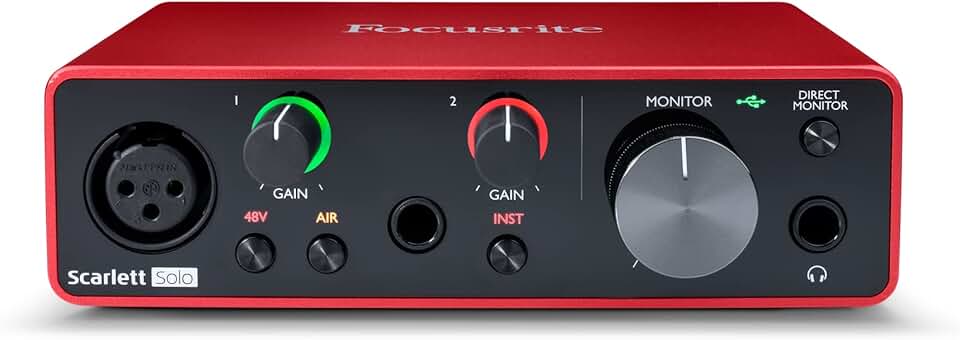
To fully leverage these AI tools, having the right hardware setup is essential. A good audio interface and studio headphones ensure that the subtle details of AI-generated stems are accurately represented during mixing.


As an Amazon Associate, we may earn from qualifying purchases.
How to choose the right AI generator
Picking the best AI music generator depends on where you are in your workflow. If you need quick demos, speed matters most. If you are building a full track, control and export options are critical.
Here is a side-by-side comparison of three leading tools to help you decide.
| Tool | Vocal Quality | MIDI Export | Stem Separation | Best Use Case |
|---|---|---|---|---|
| Suno | High | No | Yes | Vocal demos & inspiration |
| Udio | Very High | No | Yes | High-fidelity vocals |
| ToMusic.ai | Medium | Yes | Yes | Composer integration & MIDI control |
Suno and Udio excel at generating polished vocals from text prompts, making them ideal for rapid prototyping. However, they lack MIDI export, which limits their use in traditional DAW workflows. ToMusic.ai offers MIDI export, allowing composers to refine AI-generated ideas with precise control.
Consider your primary goal. Use Suno or Udio for inspiration and vocal sketches. Use ToMusic.ai if you need to integrate AI outputs into a larger production chain.
-
Define your primary workflow (demo vs. production)
-
Check for MIDI export if using a DAW
-
Test vocal quality with your genre
-
Verify stem separation capabilities
Essential gear for AI music production
AI music generators handle the heavy lifting of composition, but turning those outputs into polished tracks requires physical hardware. The right gear connects a rough AI draft with a professional release, giving you tactile control over stems and MIDI data.
Start with studio headphones that offer flat frequency response. AI models often generate tracks with boosted bass or harsh highs to sound impressive on consumer speakers; accurate headphones let you hear the actual mix balance and catch artifacts that need editing.
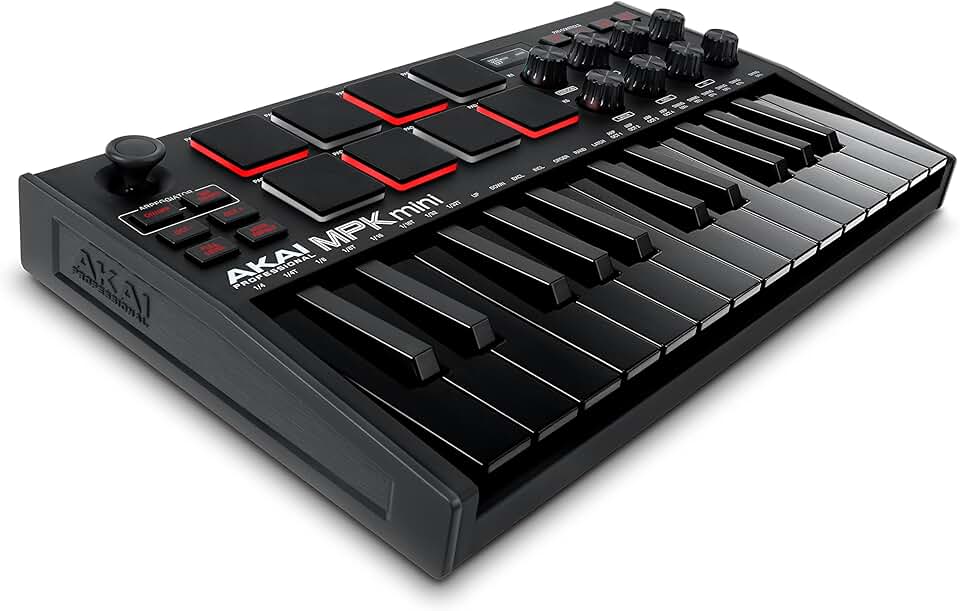
For production, a compact MIDI controller is essential. Since many AI tools output MIDI files rather than audio stems, a keyboard with velocity-sensitive pads lets you humanize the generated patterns, replacing robotic sequences with expressive performances.
An audio interface with low-latency monitoring completes the setup. It connects your microphones for vocal overdubs and your MIDI gear, ensuring you can record and process AI-generated ideas in real time without distracting delays.



As an Amazon Associate, we may earn from qualifying purchases.
Next steps for AI music integration
As AI music tools evolve, the focus shifts from simple generation to hybrid workflows. Modern generators like Suno and Udio now prioritize MIDI export and stem separation, allowing producers to refine AI outputs rather than accepting them as final tracks.
Is AI music generation ready for professional use?
Professional workflows now treat AI as a collaborative partner rather than a replacement. Research from Carnegie Mellon University suggests that while AI excels at generating inspiration and structural ideas, humans still lead in creative direction and emotional nuance. Tools are increasingly designed to integrate with DAWs, supporting stems and MIDI data for post-production.
What are the main limitations of current AI music tools?
The primary limitation remains consistency and control. While tools like Suno and Udio produce high-fidelity audio, they often struggle with complex song structures or specific instrumental requests without extensive prompting. Additionally, copyright ownership for AI-generated content remains a legal gray area, making it unsuitable for commercial releases without careful review of each platform’s terms.
Which AI music tools are best for beginners?
Beginners benefit from platforms that offer intuitive interfaces and guided creation. Udio and Suno are popular choices for their ease of use and high-quality output. For those looking to experiment with hardware, starting with a simple MIDI controller can help connect AI generation with traditional music production.


As an Amazon Associate, we may earn from qualifying purchases.
No comments yet. Be the first to share your thoughts!